Ledgers
View and edit ledger accounts for the selected company and financial year, run auto-code, and export trial balance data.
Prerequisites
Steps
Step 1: Open ledgers
- Go to Trial Balance → Ledgers.
- Review balances in the grid; use search and sort as needed.
Step 2: Auto-code (optional)
- If ledgers lack schedule codes, use the Auto Code action in the page header (when enabled in service metadata).
- Review mapped codes before generating reports.
Step 3: Export
- Use grid export actions to download ledger data for review or Excel round-trips.
- Re-import changes via Import Excel when applicable.
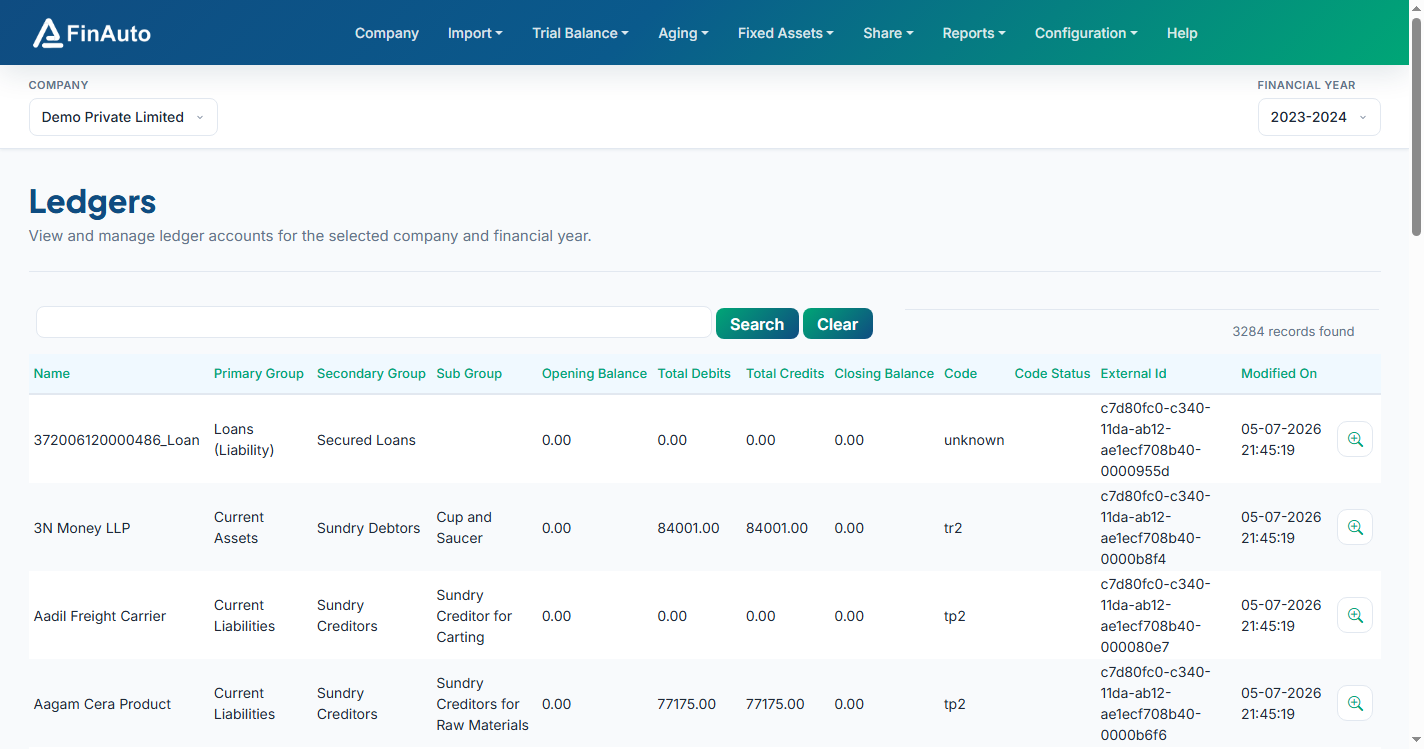
Screenshot: FinAuto Client v9.0 — Trial Balance → Ledgers
Related links
Troubleshooting
| Symptom | Likely cause | Resolution |
|---|---|---|
| Unclassified ledger on balance sheet | Missing code | Run auto-code or assign codes manually / in Tally |
| Empty grid | Wrong FY or no import | Confirm FY; re-import trial balance |
| Auto-code disabled | Metadata not refreshed | Configuration → Service → Update |
See also Common issues.
Need more help? Contact support@finautoindia.com. Do not share API keys or PAN in email.