Depreciation chart
View the financial-year depreciation schedule with WDV, rates, amounts, and net block per asset.
Prerequisites
- Fixed asset register imported
- Company depreciation method (SLM or WDV) set at company master
Steps
Step 1: Open depreciation chart
- Go to Fixed Assets → Depreciation Chart (or FY Depreciation per menu).
- Select company and FY in the top bar if not already set.
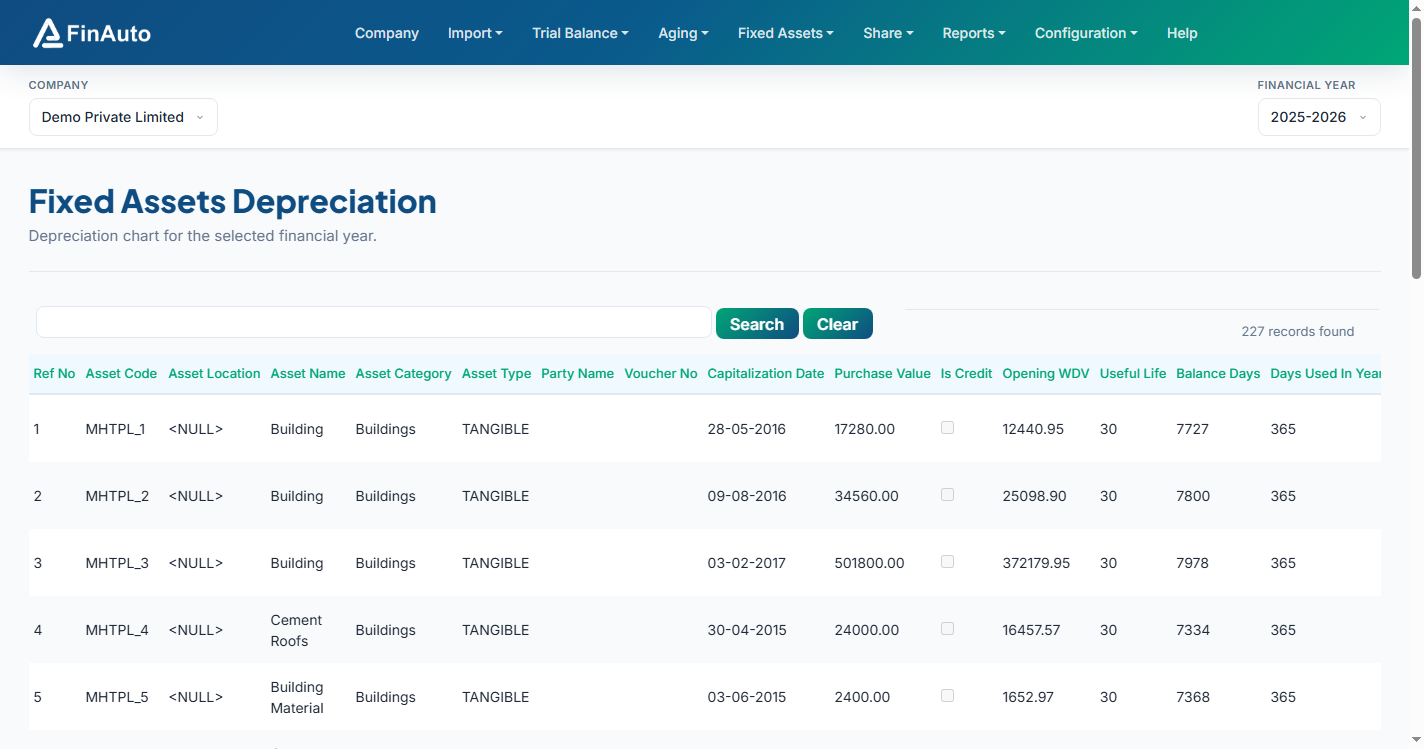
Step 2: Review calculations
- Scan asset-wise columns: purchase value, WDV, useful life, depreciation rate, depreciation amount, net block.
- Export visible columns to Excel when needed for audit working papers.
Step 3: Recalculate after changes
- After register edits or method changes, allow recalculation to complete (large registers may take several minutes).
Related links
Troubleshooting
| Symptom | Likely cause | Resolution |
|---|---|---|
| Zero depreciation | Missing useful life or rate | Edit asset in register |
| Long wait after method change | Large asset count | Wait for client message estimating recalculation time |
| Chart empty | No assets for FY | Import register data |
See also Common issues.
Need more help? Contact support@finautoindia.com. Do not share API keys or PAN in email.